An AI CRM that does the work when you ask
Ask in plain language and the WebifyGO AI Assistant finds, updates, and reports on your real CRM data, drafts quotes and emails, and briefs you before every call. It works as you, with your permissions, and nothing changes without your approval.
Runs on Claude by Anthropic · Respects your permissions · Undo AI edits for 7 days
Why most CRMs stop being used
Your whole CRM, one question away
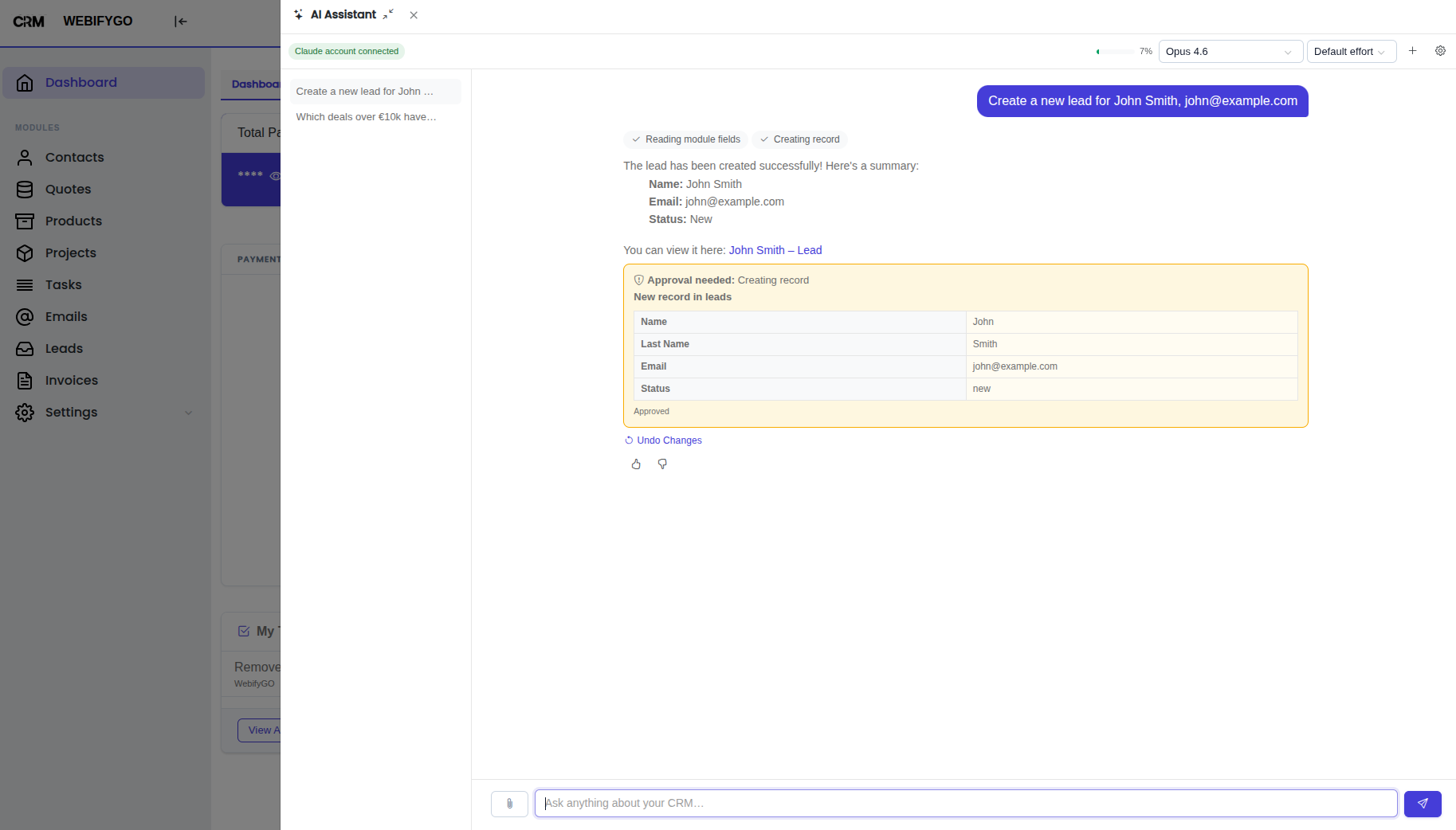
The assistant opens in a side panel on every page and knows which record you are looking at. Ask the way you would ask a colleague.
Brief me before a call
One click on any record: summary, open quotes and tickets, latest activity, and the next step.
"Brief me on Acme Corp"Find anything
Search and filter across every module without building a report.
"Leads from Italy this month with no activity"Fix data in bulk
Update up to 500 records with one approval and a preview of what changes.
"Assign these 120 leads to Sara"Quotes and invoices
Build a quote with line items from your catalog, then invoice it once accepted.
"Quote Acme for 10 Pro licences, 15% off"Follow-ups and email
Find who needs chasing and draft the emails. Nothing is sent until you approve.
"Follow up on quotes open longer than a week"Reports and dashboards
Live numbers from your data, and dashboard widgets built on request.
"Pipeline by stage for this quarter"Business card to contact
Attach a photo, PDF, or CSV and the assistant turns it into records.
"Save this card as a contact"Meeting notes to follow-ups
Paste your notes. They are logged on the right record, with reminders for every next step.
"Log these notes on the Northwind deal"AI that runs without being asked
AI in your workflows
When a lead or ticket comes in, an AI action can qualify it, fill fields, add a comment, or draft a reply. Test it on a real record first and cap how often it runs each day.
Scheduled briefings
Your daily plan, overdue invoices, or pipeline summary every morning, every weekday, or every week, saved in the chat and emailed to you.
Answers from your knowledge base
How-to and policy questions are answered from your own knowledge base articles, with links to the source.
An assistant you can trust with your data
The WebifyGO assistant does more than summarise: it changes real records. So every guardrail is built in from day one.
Get a DemoRole, module, and field permissions apply. It sees and changes only what you can.
Creates, edits, deletes, and emails wait for your OK, with current and new values side by side.
Take back the edits and new records from any reply in one click.
AI changes are marked "AI" in each record's history.
Turn it on per role, set chat retention, and see usage and feedback per user.
Your CRM stays in your dedicated instance. The assistant reaches it only through the same permission-checked API your team uses.
Gets better the more your team uses it
Skills for your processes
Playbooks like "how we build a quote" or "how we triage tickets", assigned to the roles that need them. Start from a library of ready-made skills.
Personal memory
It remembers your preferences and context between chats. Each user sees and edits only their own notes, and can turn memory off.
Company knowledge
Rules your team teaches it can become company knowledge, shared with chosen roles only after an admin approves them.